 Armand Halbert
Software Engineer
Contact:
armand.halbert@gmail.com
Armand Halbert
Software Engineer
Contact:
armand.halbert@gmail.com
Computing in the Era of Doom: What Were PCs Like in 1993?
Game Engine Black Book: Doom. By Fabien Sanglard. 429 pages.
Doom. The game that popularized the term “deathmatch”. The game that made modding accessible to millions of players. The game that killed productivity across thousands of offices around the world. It wasn’t the first first-person shooter (for example, Doom’s developer id Software had released Wolfenstein 3D just a year prior) but it was the game that put the genre on the map. Fabien Sanglard’s excellent book dives completely into the internals of the game, detailing the compromises made to render a 3D world on consumer hardware of the era. The result is not just a technical reference but a memory capsule of what it was like to develop and play games on a PC in 1993, when every byte of memory mattered and every CPU cycle had to be fought for.
Playing Doom in 1993 required an expensive machine, even at sub-20 Frames Per Second (FPS). How much would such a machine cost? What was the state of the art in features back then and how did it work?
The CPU
The state-of-the-art CPU of that era was the Intel 486 DX2, which was 2.5x as fast as a predecessor 386 running at the same clock speed. How did Intel achieve such a feat? Through improving the instruction pipeline and adding a brand new on-CPU cache.
The Pipeline
What is pipelining?
Imagine you have multiple roommates sharing a laundry room, all wanting to do one load of laundry at the same time. It would be pretty silly for one roommate to reserve the whole room at the same time. Instead, once one roommate's washing is done and in the dryer, the next roommate can start their washing.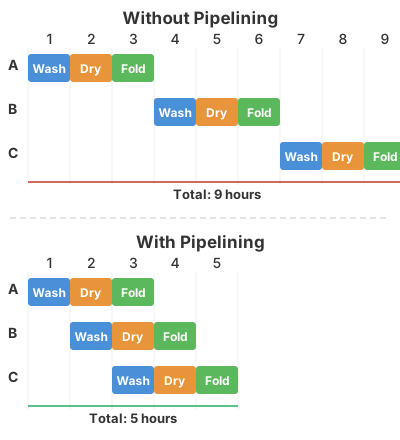 A similar idea applies to CPUs. Each instruction goes through several phases
during its execution. A processor might have the following phases:
A similar idea applies to CPUs. Each instruction goes through several phases
during its execution. A processor might have the following phases:
- Prefetch - grab the instruction from memory before it is needed
- Decode - Figure out what the instruction does
- Execute - Actually execute the instruction (Add, subtract, jump)
- Write-Back - Write the results of the executed instruction to the registers and/or cache
In the 386, there was a 3-phase pipeline: Prefetch, Decode and Execute. However, decoding took two clock cycles to complete, meaning that an instruction could only be executed every two cycles. The 486 introduced a 5-phase pipeline with two decode steps, allowing an instruction to be executed each cycle. This alone doubled the throughput of the processor.
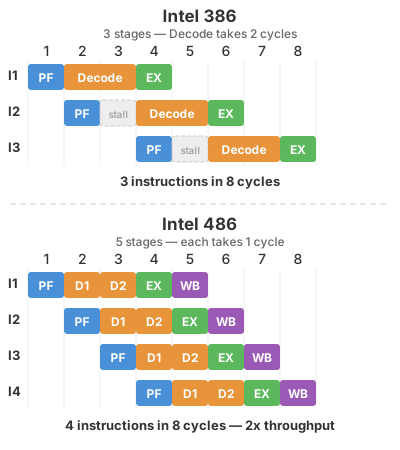
However, there was a tradeoff: a deeper pipeline is more likely to starve. If for some reason the pipeline is forced to clear (for example: an if statement jumping to another memory address), it would take five cycles to restart the flow of instructions again rather than the four of the 386. If the 486 pipeline frequently stalled, it would actually be slower than the 386.
The core problem was getting instructions and data from RAM to the CPU. While CPUs were getting faster, memory access times were not. Fetching from RAM took at minimum two cycles, usually more. If the CPU was constantly waiting for information from RAM, that was time not spent computing. What Intel needed was a way to bring instructions and data to the CPU before they were needed, ensuring an always full pipeline.
What Intel needed was an on-CPU memory cache.
The Cache
When designing the 386, Intel engineers originally planned to add a cache, but it would not fit in the lithography machine that made the chip, so it was abandoned in favor of an optional off-CPU cache. Over the next four years, semiconductor manufacturing processes improved enough for Intel to add an 8 KiB cache on the 486. It’s a very small cache: for a computer with 4 MiB of RAM, 8 KiB only covers .2% of the available memory space. But it didn’t need to be large – it just needed to hold the right information at the right time.
Unlike future processors like the Pentium 4, the cache did not attempt to predict what it would need in advance. When the processor attempted to access memory not in the cache, (known as a cache miss), the processor would instruct the memory controller to get the missing information. But the processor would not just get that byte and cache it, it would pull in the surrounding 15 bytes referred to as a cacheline. This exploited spatial locality: if your code accesses one byte, the surrounding bytes are likely to be needed soon too. Sequential code execution or iterating through an array would naturally fill the cache with useful nearby data. This worked well in practice for the tight inner loops typical of game engines like Doom’s renderer, where the same instructions and data structures were accessed over and over.
Sounds great in theory, but there were some problems: Because the 486’s cache was unified (shared between data and instructions), a data-heavy operation could evict instructions from the cache, and vice versa. Imagine Doom’s renderer is running a loop — the instructions for that loop are in the cache, running at 1 cycle per hit. Then the loop reads a texture or a lookup table, and that data load evicts some of the loop’s own instructions. On the next iteration, those instructions have to be fetched from RAM again, stalling the pipeline. The code is fighting with its own data for 8 KiB of space. This phenomenon is known as conflict misses or collision misses.
Later processors like the Pentium solved this by splitting the cache into a separate instruction cache and data cache (8 KiB each), so the two could never interfere with each other. For the 486 however, Intel would have to compromise with a unified cache. Engineers instead used a clever trick to avoid conflict misses: set up the cache so that 4 different cachelines can co-exist at the same time. This is known as a 4-way set associative cache.
To understand what this means, consider the simplest alternative: a direct-mapped cache. In a direct-mapped cache, each memory address maps to exactly one slot (known as a set) in the cache. If two addresses happen to map to the same slot (and in 8 KiB of cache with megabytes of RAM, collisions are frequent), they evict each other every time — even if the rest of the cache is completely empty.
In the following image, we have a cache with 4 potential memory slots, A, B, C, and D. A and C map to Set 0 and B and D map to set 1. In a direct-mapped cache, A and B have to be evicted to free up room for C and D even if Sets 2 - 7 are empty. Why can’t those slots be used for A and B? If any slot could be used for any cacheline, there would have to be a database linking each slot to each address. That would take up more space that could be used for the cache, and require a time-consuming lookup through the entire database before finding the cacheline - defeating the purpose of the cache.
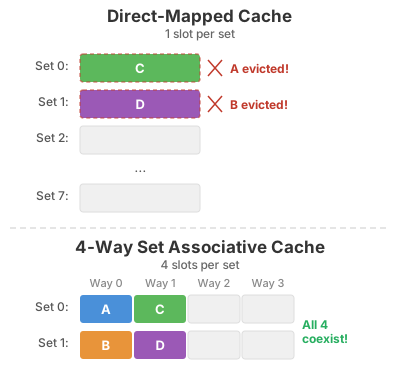
The 486’s 4-way set associative design instead divided the cache into 128 sets containing 4 ways (slots) rather than 512 sets. A given memory address still maps to a specific set, but within that set it can occupy any of the 4 ways. This means 4 different addresses that would have collided in a direct-mapped cache can now coexist. Only when a 5th competing address arrives does something need to be evicted. Through this design, the 486 managed to hit the cache 92% of the time during normal operation (known as cache hits).
The improved throughput of the 486 would allow Doom to run at a decent framerate. But Doom’s designers would have to contend with an even bigger limitation: The dreaded DOS memory limit.
RAM and DOS Extenders
640K ought to be enough for anybody
While Bill Gates did not actually say the above oft-repeated quote, it was true that DOS had a limitation of 1 MiB of RAM with 384 KiB reserved for system use, leaving only 640 KiB for applications. DOS used some of that 640 KiB, so in practice the amount of memory for an application was less than that.
Why did DOS have this limit? The original processor for the IBM PC, the Intel 8088 (an 8086 variant) had a maximum addressable memory of 20-bits (1 MiB). However, the actual processor could only handle 16-bit words (64 KiB). To use 20-bit memory addresses, Intel engineers came up with a bizarre trick called segmented addressing where two 16-bit addresses (a segment and offset address) were combined to form a 20-bit address.
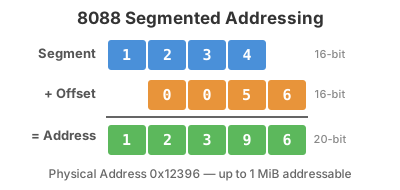
This design had a lot of problems: memory manipulation was error-prone since different segment/address combinations could point to the same real memory address. The situation only became more complicated with the 24-bit 286 and 32-bit 386. Intel’s solution was to let post-8088 processors run in two modes: Real Mode, where the processor functioned as a very fast 8088, and Protected Mode which allowed you to use the full 32-bits of a 386 or 486.
Problem solved! Well, it would be if Microsoft’s MS-DOS supported Protected Mode. Unfortunately, in order to keep applications backward-compatible the OS only allowed real mode, forcing developers into the 640 KiB limit. This created a market for DOS extenders that allowed DOS to use the extra memory.
How did they work? An application (DOS could only run one thing at once, after all) would start in protected mode. If it needed to make a system call to DOS, the extender would intercept the call, switch the processor to real mode, make the system call, translate the result from 16-bits to 32-bits and finally switch back to protected mode.
They were complicated to set up. You had to locate the DOS extender file, load it and the application, and configure the application to use it. This required 100 lines of C code. Fortunately, enterprising developers from Canada solved the problem by creating a compiler that bundled the extender into your program. Watcom’s C compiler retailed for mere $639 ($1460 today). Hard to believe compared to today, where gcc and clang are free world-class compilers. But for the price, Watcom would free you from the hated 16-bit limitations of MS-DOS.
Like many games and applications of the era, Doom did not use the malloc/free
memory allocators provided by libc and instead opted to use its own memory
manager. This was to prevent memory fragmentation, where as memory objects are
allocated and freed, memory has a lot of small holes in it, making it impossible
to allocate a larger object.
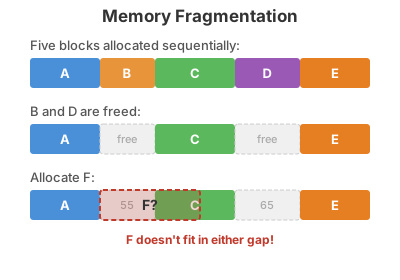
In this example, there is enough room for F to be allocated, but there is not a hole big enough for it to fit in, so F cannot be allocated. While memory could be defragmented, the game has to pause to consolidate memory. This would be unacceptable.
To stop memory fragmentation from crashing the game, Doom used a zone-based memory-manager: all assets for a level were grouped into the same zone together, so when you finished the level, the entire zone could be freed in one sweep, leaving a large block for the next level to use.
Graphics
Having a fast CPU and RAM to render Doom’s semi-3D environments was important, but the pixels still had to get to your monitor somehow. Once the CPU rendered a frame of Doom, it had to be sent over the bus to the VGA (Video Graphics Array) controller. VGA and the ISA bus were never designed to play fast action games, but to render graphs, text and spreadsheets. If you ran VGA in 640 × 480 as Windows 3.1 did, you were limited to 16 colors. You try animating demon gore with at most two shades of red! If you wanted more colors, you could use “Mode Y” which supported 256 colors at 300 × 200. Doom’s developers opted to use that mode.
What was the ISA bus and why was it a performance killer?
In addition to the difficulty programming for VGA, actually getting the frame RAM to VRAM was a very slow operation. On PCs of the era, if you wanted to send or receive data from the CPU/RAM to a device like a hard drive, graphics controller or modem the data had to transit over the ISA bus. This feature of the PC had not been updated since 1984, and while its theoretical throughput was 8 MiB/s, in practice it was 1-2 MiB/s and could be as low as 500 KiB/s.Doom ran in "tics" of 35 tics/s so it could go up to 35 fps. But if you actually wanted to do that, you had to copy 35 frames a second to the VGA controllers RAM, and that required being able to transfer 2.1 MiB/s. That would take more than the available bandwidth of the bus.
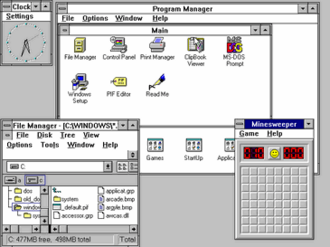
Even simple desktop GUIs like Windows 3.1 had to resort to dragging a window by its outlines in order to get acceptable performance from PCs of the era. If it showed the contents of the window while moving it, the graphics controller would be unable to keep up.
VLB was about 10x faster than ISA, and was very simple: It adopted the same protocol as the 486 Bus Unit Protocol. The bus is "local" in that it's directly hooked up to the CPU, not requiring a chipset to mediate between the CPU and the hardware. This sped up adoption.
There were, however, some downsides:
The bus ran at the same speed as the CPU (since it was synchronous with the CPU) and it had a lot of instability past 40 MHz. The electrical load driven by the CPU was inversely proportional to the clock speed, so the number of slots available decreased if you increased the clock speed. 3 could be provided at 33 MHz, 2 at 40, and just 1 at 50 MHz.
Hardware manufacturers had to take care their hardware peripherals ran at a variety of speeds, leading to a lot of compatibility problems and frustrations for consumers who wanted a computer that just worked.
Then in 1993, Intel introduced the Pentium Bus Protocol, which was based on PCI and totally incompatible. VLB quickly faded away, but it was there long enough to make Doom playable.
VGA was difficult to program for. The CPU did the actual work of rendering, but then the scene it had rendered in RAM had to be copied to the VGA controller’s Video RAM (VRAM). To compensate for having only 64 KiB addresses for 256 KiB of video graphics memory, the VRAM was divided into 4 memory banks:
- Bank 0: Pixels 0, 4, 8…
- Bank 1: Pixels 1, 5, 9…
- Bank 2: Pixels 2, 6, 10…
- Bank 3: Pixels 3, 7, 11…
This design also allowed the VGA controller to read from all 4 banks in parallel, making it fast enough to drive a 60 Hz monitor. However, for the programmer it got complicated very quickly: a simple operation like drawing a horizontal line might span all four banks, requiring four separate bank switches and four separate copy operations. Every pixel write required the programmer to calculate which bank it belonged to, switch to that bank if necessary, and compute the correct address within the bank. Forgetting to switch banks or switching to the wrong one produced garbled output with pixels scattered across the screen.
An ordinary programmer would despair at such a setup. But programmer John Carmack instead turned VGA’s weaknesses into a strength. Doom cleverly stored three frames in VRAM: one currently drawn to the screen, the next frame to display, and the one currently being copied from RAM to VRAM. This triple-buffering eliminated screen tearing, where the monitor displays a half-drawn frame. The renderer could draw to an off-screen buffer while the monitor displayed a completed one, then swap them during the monitor blank interval when the monitor finished drawing.
Sound
Who can forget the iconic soundtrack to E1M1?
Doom’s iconic sound effects and music didn’t come for free. While the PC came with a very basic speaker, it was mostly used to diagnose system health at startup. The number of beeps (1 = healthy) would give you some diagnostics, but any serious gamer had to invest in a sound card.
Here’s a comparison of them over time through another classic PC game, The Secret of Monkey Island:
Let’s take a look at a few of these cards:
SoundBlaster 16
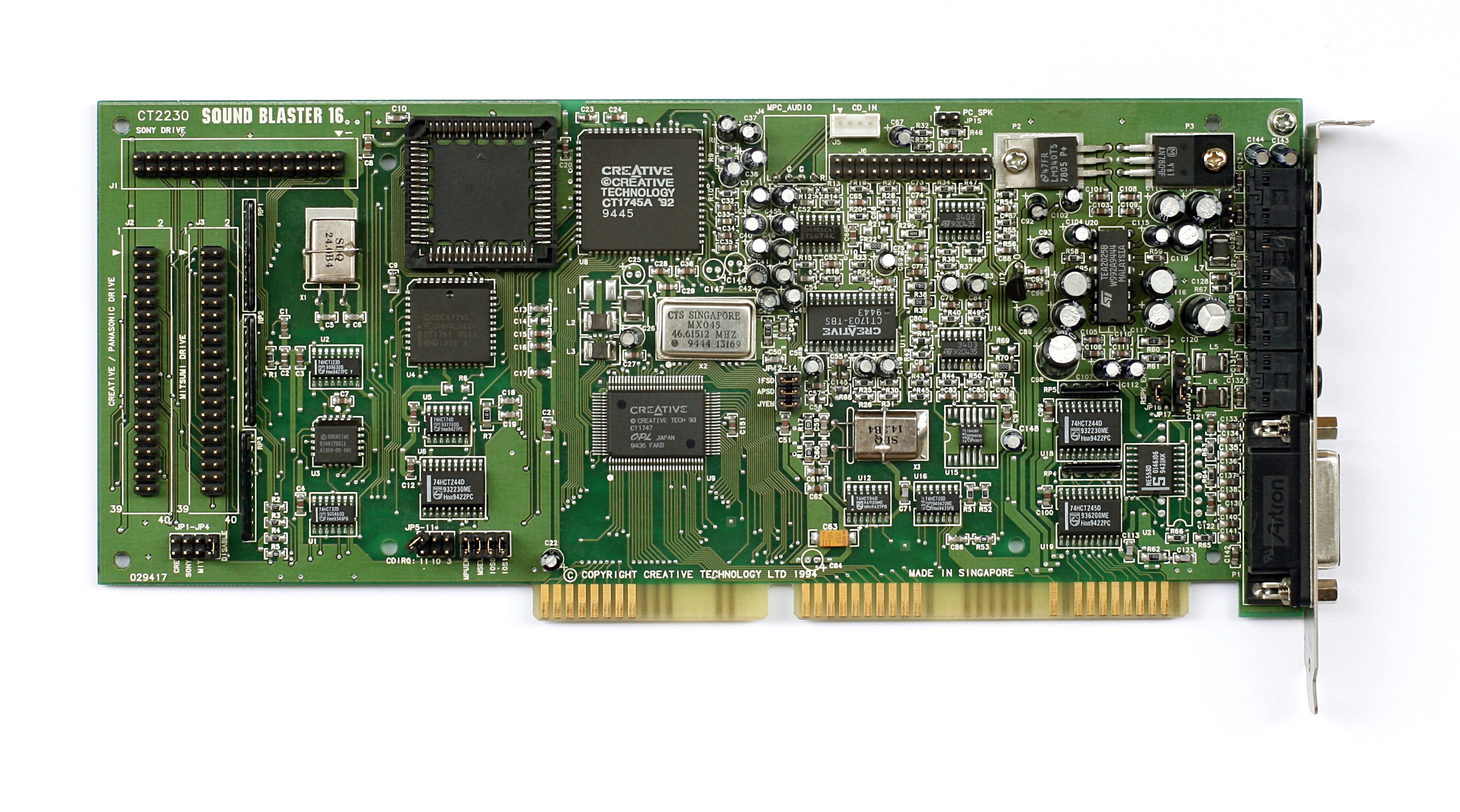
The SoundBlaster line of cards was the standard everyone else had to match. If your card wasn’t SoundBlaster compatible, it might as well not exist. The SoundBlaster consisted of two chips: an FM synthesis chip for music, and a sample playback chip for playing sound effects. To play music, the programmer would describe several sine waves that approximated an instrument. Since the SoundBlaster faked musical instruments with FM synthesis, the result had a buzz to it that defined the audio of games from that era.
To play sound effects, the programmer would stream the sound effect to be sampled to the card directly. The challenge was that there was only one channel for sound effects, but Doom needed up to 8 simultaneous sound effects (gunshots, monster growls, doors, footsteps). Doom had to mix all these sound effects before sending the final result to the SoundBlaster.
Gravis UltraSound
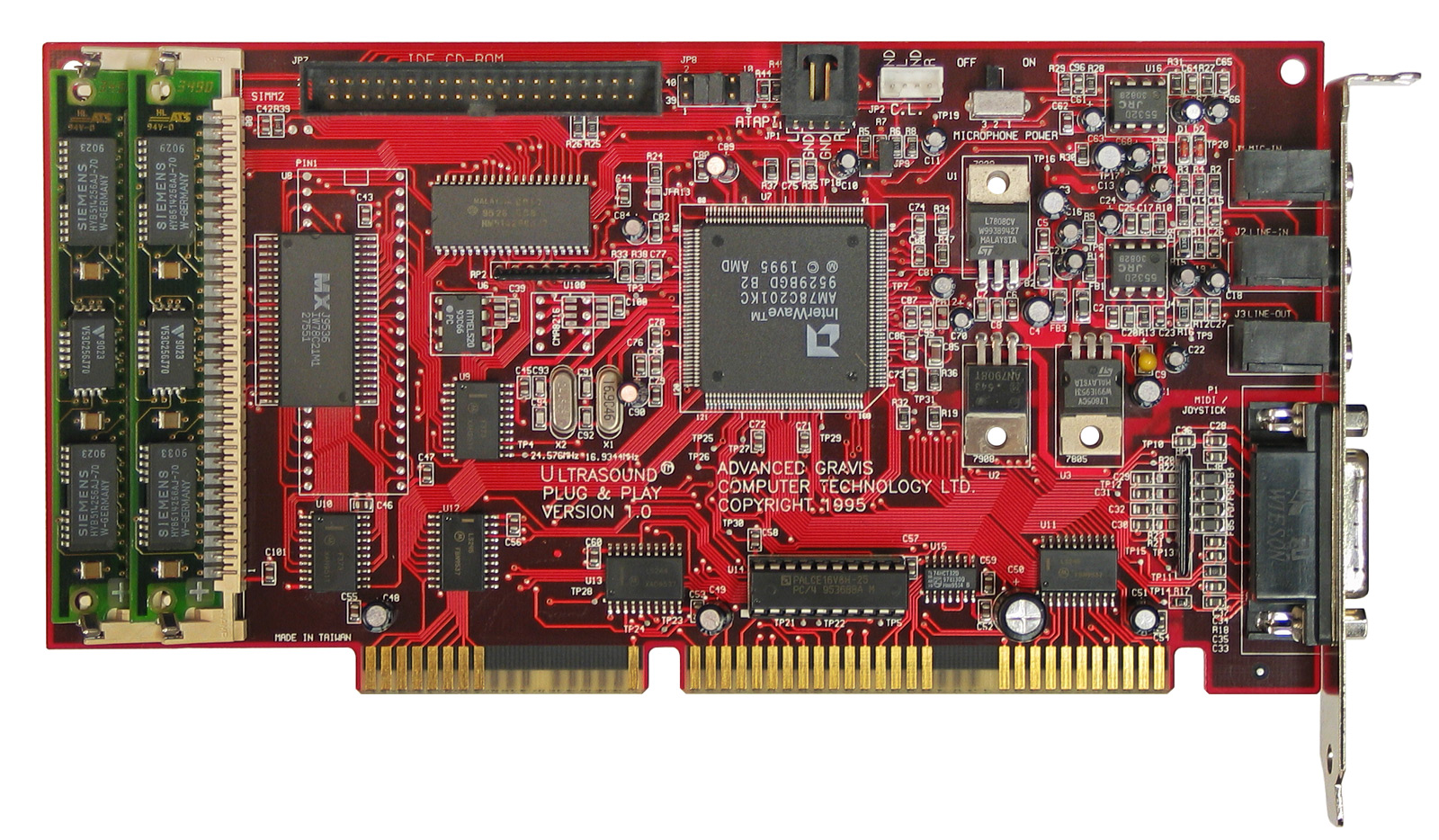
The Gravis UltraSound, affectionately referred to as the GUS, was SoundBlaster compatible, but also featured what they termed “Wavetable Synthesis”: they actually used recorded samples of musical instruments to play back music. A piano sounded like a piano, not a buzzy approximation of one. This required having samples to play back on the hard drive, and Gravis provided a 12 MiB driver to store them. When hard drive space was between 40 MiB and 300 MiB, this was a high cost for quality sound.
The GUS had its own onboard RAM for playing sound effects. It shipped with 256 KiB of RAM and was upgradable to 1 MiB. Since Doom could load the sound effects into the GUS’s RAM and tell it to play the relevant effects, this improved the performance of the game, but not by a lot. At the end of the day, you bought an UltraSound for the music, not for a better framerate.
However, Creative still dominated the gaming market because the GUS’s SoundBlaster emulation was not reliable and often did not work. Consumers anxious to avoid compatibility problems opted for the cheaper SoundBlaster, and Doom was one of the few games to natively support the card. But it developed a cult following among audio purists and is still loved by retro gamers today.
Roland SoundCanvas
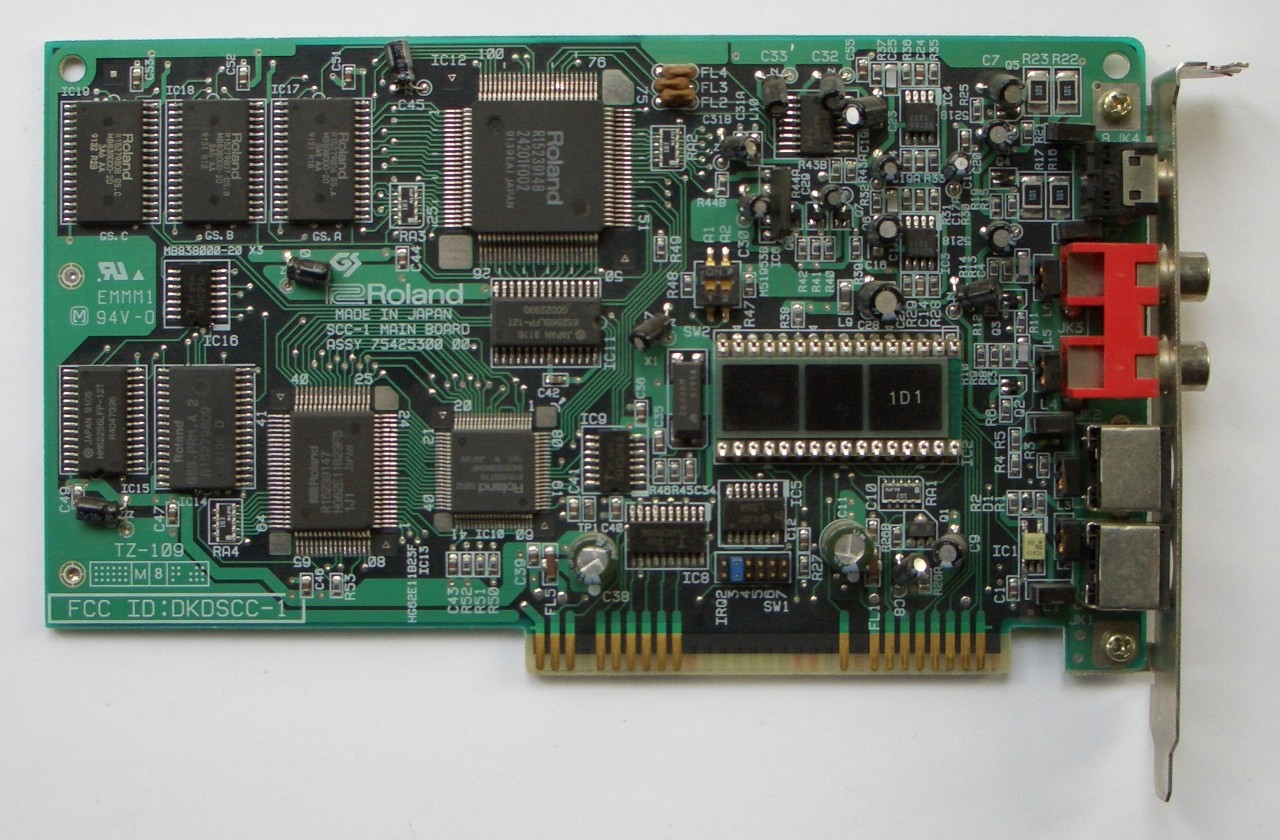
Unfortunately for Gravis, there was one card for music that towered above them all: the Roland SCC-1. Roland introduced a standard of 128 instruments called MIDI (Musical Instrument Digital Interface) that anyone could use. Musicians could use a musical keyboard to play any number of instruments, then play them all back in a beautiful symphony.
The problem was that Roland cards did not support the format for sound effects (PCM) used by games of the era. If you wanted the best sound, you needed to buy a Roland sound card and a GUS or SoundBlaster for sound effects, then mix the audio streams yourself. Not only was this complicated, but it was also expensive: $499 in 1991 ($1,140 today).
Why Doesn’t This @#$%ing Thing Work?
//
// Why PC's Suck, Reason #8712
//
void I_sndArbitrateCards(void) {
The above code snippet is real and from the audio device detection function used by Doom. This was the days before standardized sound libraries making playback a breeze: a programmer had to actually write code for each of the sound cards they wanted to support. Id, facing pressure to develop Doom in 13 months opted to use a third-party library called DMX developed by Paul Radek to support sound on DOS. John Carmack would later say using DMX was the biggest mistake in developing Doom, because it meant the DOS version could not be open sourced later. In addition, as Doom’s development neared the end, the relationship between Id and Radek began to sour.
For the gamer, it wasn’t a fun experience either: the card didn’t just work when you plugged it in. For each game, you had to run SETUP.EXE and set the sound card’s settings, such as IRQ, DMA channel, and base I/O port. How did you find those numbers? By opening up the computer and looking at little switches on the card or motherboard called jumpers. And if you got them wrong? Well, you opened it up and tried again. But if you got it working? The experience of hearing Doom’s sound at its best was like nothing else offered at the time.
Networking
Doom pioneered networked multiplayer gaming. It supported cooperative play through the main campaign but the real innovation was a new mode that id called deathmatch. In this mode players would fight each other, competing to be the one to get the most kills. While the term “deathmatch” had been used even in first-person shooter games before Doom, Doom made it a common household term.
Unlike games today, Doom uses a peer based networking model instead of a client-server model. Typical games have a master “server” that stores the game state, keeps track of where everyone is, etc; A player connects to the server, sends their actions to it, and receives updates about other players from the server.
Doom instead sent your actions to all the players in the game, eliminating the need for a server. The game ran on 35 tics a second, and when networked, the game waited for each player to send their action for the tic to you before proceeding to the next one. This worked well because Doom didn’t run over the internet, but instead over a LAN or if you really wanted to get crazy, a modem directly calling a friend. But it also meant you ran your deathmatch at the speed of the slowest player. If one connection hiccuped, every other player froze waiting for their inputs. And if any machine ever did drift out of sync the simulations diverged permanently and the game became unplayable. You could not join a game already in place, since you would not have the history of actions required to have the same game state as everyone else. And if your connection died, your avatar would be stuck there for the rest of the game.
Doom was before the days of ubiquitous internet and instead used more primitive methods of communication. Let’s look at what it supported.
Serial cable (null-modem)
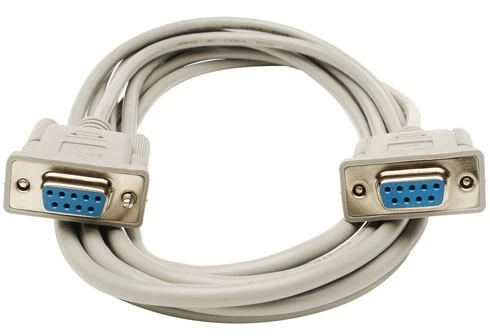
The cheapest option. A null-modem cable was a special serial cable called a that you plugged into the COM port. About $5 at any computer shop. Strictly two players, and you needed to be sitting in the same room — the cable stopped working after a few feet. For two friends with a couple of PCs, it was the easiest way in.
Modem
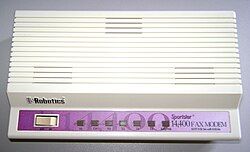
For two players in different houses, Doom could play over a modem. One player’s PC would dial the other’s phone number, and the two modems would negotiate a connection — the iconic screech you may have heard from dial-up internet. Speeds ranged from 2,400 to 14,400 bits per second in 1993, with latency in the 200-500 ms range. This was slow and expensive (long-distance phone calls were billed by the minute), and limited to two players, but it meant you could deathmatch a friend across the country if you were both willing to pay for it.
Not only did you have to pay for the phone call, modems themselves were expensive: A top modem capable of 14.4 kb/s (kilo bits per second) would run you $150 - $300. It would take you 25 minutes to download the shareware version of Doom (2.7 MiB) on such a modem, and the game had so much anticipation that the person at University of Wisconsin assigned to upload it couldn’t get through to upload it!
IPX over LAN
While two player co-op or deathmatch was mindblowing at the time, the premier multiplayer experience was 4 players on a local network. Doom used IPX (Internetwork Packet Exchange), a protocol from Novell’s NetWare that was the de facto standard for office and college campus LANs in 1993. If your institution ran NetWare – and most did – every PC on the network already had IPX drivers loaded. All you needed was a network card and the right cable.
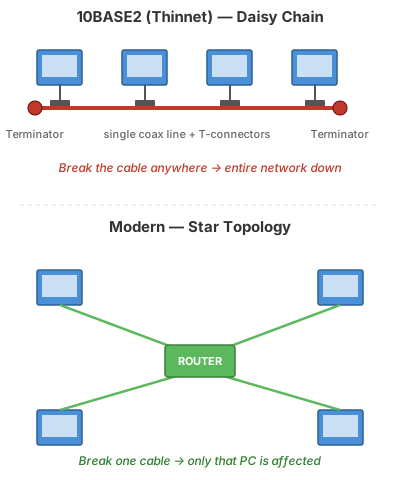
What sort of cable was used for IPX networks? The standard of the time was called 10Base2, often referred to as “Thinnet”. You networked all of the computers together with a single cable, rather than each computer getting its own cable and connecting to the router. This configuration is referred to as a “Daisy Chain”, and required a cap at each end of the cable to prevent the network from reflecting back on itself and bringing the network down. Unlike modern networks, if any part of the daisy chain was broken, it would break the entire network.
John Carmack Breaks the Pre-Internet
Doom used IPX broadcast packets to communicate between the players. This seemed like a good efficiency to me a four player game just involved four broadcast packets each frame. My knowledge of networking was limited to the couple of books I had read, and my naive understanding was that big networks were broken up into little segments connected by routers, and broadcast packets were contained to the little segments. I figured I would eventually extend things to allow playing across routers, but I could ignore the issue for the time being.-- John Carmack
What I didn’t realize was that there were some entire campuses that were built up out of bridged IPX networks, and a broadcast packet could be forwarded across many bridges until it had been seen by every single computer on the campus. At those sites, every person playing LAN Doom had an impact on every computer on the network, as each broadcast packet had to be examined to see if the local computer wanted it. A few dozen Doom players could cripple a network with a few thousand endpoints.
The day after release, I was awoken by a phone call. I blearily answered it and got chewed out by a network administrator who had found my phone number just to yell at me for my game breaking his entire network. I quickly changed the network protocol to only use broadcast packets for game discovery, and send all-to-all directed packets for gameplay (resulting in 3x the total number of packets for a four player game), but a lot of admins still had to add Doom-specific rules to their bridges (as well as stern warnings that nobody should play the game) to deal with the problems of the original release.
The Whole Package
If you wanted to play Doom at anything approaching 30 FPS, you needed the following:
- 486 DX2 ($550)
- Diamond Stealth Pro Graphics Card ($350-$500)
- SoundBlaster 16 ($179)
Adding in a motherboard, hard drive, power supply etc would run you another $1000, bringing the cost to around $2179 - close to $5000 in today’s dollars. For comparison, the median household earned $31,240 in 1993. Such a computer would represent 7% of the median family’s yearly income. And if you wanted the best sound, you needed two sound cards, not just a SoundBlaster. Nor would such a computer come with a network card or modem to play multiplayer.
According to Sanglard, a machine with those specs could play Doom at 24 FPS. Now we complain if a game is one frame below 60 fps.
Sometimes I like to appreciate just how far we’ve come in computing in the past 33 years. I was too young to experience the glory days of Doom firsthand — by the time I was old enough to play games, I never had to think about DMA channels or IRQ jumpers. The abstractions that hide all of this from modern developers are, for the most part, a gift: I can write a game in Unity without knowing what a cacheline is, much less having to hand-tune a renderer to fit inside 8 KiB of it.
But there’s a craft in the constraints of 1993 that modern development rarely demands. Every system in Doom — the zone memory manager, the column renderer, the lockstep network model, the software sound mixer — exists because the hardware forced it into existence. With 4 MiB of RAM and a 66 MHz CPU, you don’t write a generic engine. You write the specific engine that fits the shape of the specific problem on the specific hardware you have. The result is a piece of software so tightly coupled to its era that reading about it today feels like reading about a ship in a bottle. Nothing was left to the runtime or the framework because there was no runtime or framework.
That’s what makes Sanglard’s book worth reading even if you never plan to write your own game engine. It’s a snapshot of a moment when every programmer was also a hardware engineer by necessity, when shipping a game meant understanding the silicon it would run on from the ground up. We gained a lot by abstracting away from that world. But it’s worth remembering, now and then, what the view looked like from down there.
Works Cited
Crawford, John H. Calif.. “The i486 CPU: executing instructions in one clock cycle.” IEEE Micro 10 (1990): 27-36.
Crawford et al., Intel 386 Oral History Panel. https://archive.computerhistory.org/resources/text/Oral_History/Intel_386_Design_and_Dev/102702019.05.01.acc.pdf
Shirriff, Ken. “Examining the silicon dies of the Intel 386 processor”. https://www.righto.com/2023/10/intel-386-die-versions.html
Sanglard, Fabien. Game Engine Black Book: Doom.
Totilo, Stephen. “Memories of Doom”. Kotaku. https://kotaku.com/memories-of-doom-by-john-romero-john-carmack-1480437464